Posts

MODULE 4 Activity: Getting to know WATO
Image
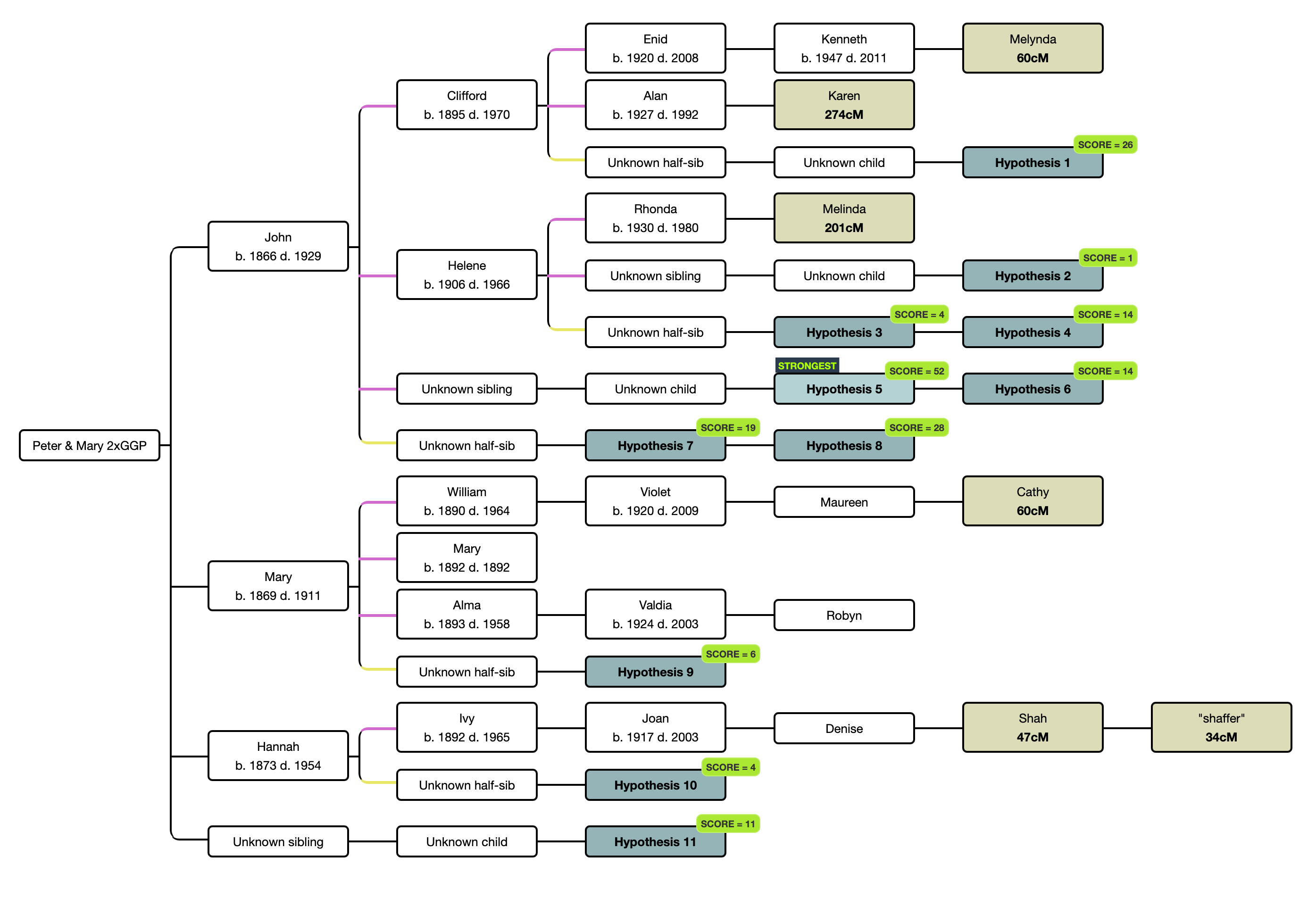
In this activity, you're placing yourself (the target/tester) into a well known tree - your own well researched tree!  Chose one of your great-great-grandparent couples where you have a group of known AncestryDNA matches who have that couple as your MRCA. Build a WATO tree from the great-great-grandparent couple out to each of the matches where your shared DNA is less than 400cM and enter the cM you share with these matches. Select "switch to beta probabilities" - do this whenever you're using AncestryDNA matches, Use the "Suggest Hypothesis" function at WATO and delete any hypotheses that don't meet the "time and place" criteria. Which hypothesis are you? Is it the strongest hypothesis? Now include any matches where your shared DNA is between 400cM and 1500cM and enter the cM you share with these matches.  Use the "Regenerate Hypothesis" function at WATO and delete any hypotheses that don't meet the "time and place" cri...

MODULE 4: " What are the odds?" (WATO) tool at DNA Painter

Image
These notes are for participants in the Society of Australian Genealogists' program,  Analysing your AncestryDNA results . Others are welcome to use these notes for their personal research. Please contact me at  chrisw9953[at]gmail[dot]com for other uses.  I'll strive to update the notes as there are further developments or my understanding of the area grows. Remember that WATO is useful to record the relationship between your DNA matches where they share common ancestors. Using WATO to examine hypotheses is a more advanced technique that will take time to understand. From reading, watching and looking at WATOs, these are a few things I keep in my mind as I develop WATOs. The fact that WATO only looks at one ancestral line leads into the search for the two ancestral lines to add important evidence of the relationship between the target and DNA matches.   Working out the relationship with a DNA match This can be difficult because- There’s...

MODULE 4 Preparation: "What are the Odds?" (WATO) tool at DNA Painter

Image
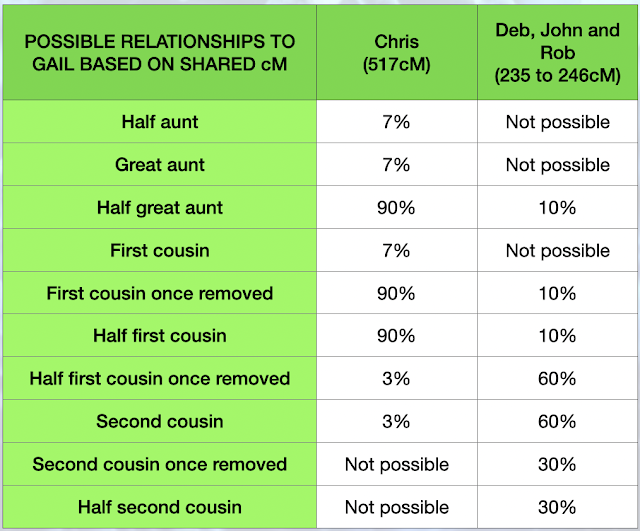
These activities are designed to give you some familiarity with WATO prior to Module 4. To undertake these activities, you should register for a free  DNAPainter.com  membership if you don't already have one. Just do as much as you can. There's a link to a 30 minute video I've prepared to explain the case study  HERE. If you have any questions, your can raise them in our discussion session or post them in Basecamp. Research question:  What is Gail's relationship to Chris, Deb, John and Rob? This is an example of a DNA dilemma from my family. You were introduced to the case study during the Module 3 presentations. In the Module 4 presentations, we’ll take some twists and turns with the case study to look at the WATO tool. What we know: Gail is a shared match with Chris, Deb, John and Robert.   Deb, John and Rob are siblings. Chris is their first cousin. Deb, John and Rob's mother, Pat, is the sister of Frank, Chris's father. Frank and Pat are the children of...

MODULE 3: Three ways to add a "hanging branch" to your Ancestry tree

Image
NOTE - Ancestry images in this blog are not current but the process is the same. To get the best out of my family history research, including DNA, I have a deep and broad public tree at Ancestry . There are currently over 15,000 people in my tree and many are "hanging branches". My tree is named as a "DNA Research Tree". The tree overview reads- "A working tree full of branches and twigs used to research my family with as much evidence as possible. If you have any questions or issues with what I've recorded, please contact me through Ancestry or at email[at]gmail[dot]com. Happy researching!" Many people choose to make their Ancestry trees private, searchable or unsearchable. While experienced researchers know how to navigate through private, searchable trees, remember that most of your "DNA cousins" are inexperienced. Some researchers choose to have a public tree containing just their ancestral pedigree back to great-great-grandparents. Whic...

MODULE 3: Building research trees at Ancestry

Image
These notes are for participants in the Society of Australian Genealogists' program,  Analysing your AncestryDNA results . Others are welcome to use these notes for their personal research. Please contact me at  chrisw9953[at]gmail[dot]com for other uses.  I'll strive to update the notes as there are further developments or my understanding of the area grows. In the following table, you'll see when I use private, unsearchable (Quick & Dirty) trees at Ancestry and when I do the research as a  "floating branch"   in the tree attached to my AncestryDNA test.   You can hear Blaine Bettinger speak about developing "Quick and Dirty trees"  HERE. The key to researching your DNA matches is finding the common ancestors that you share with the match or group of matches. The closest ancestors that you share with the match are called "most recent common ancestors" (MRCA). Here are some reason that you can’t find a MRCA with your match or a group of mat...

Module 2: Grouping activity solution and recap on your activities

Image
To recap on the messages from the earlier post with the activity:- You'll now be sorting your matches into groups. You might have initially sorted to your paternal (P0) and maternal (M0) lines and then moved to your four grandparent lines - P1/4, P5/8, M1/4 and M5/8. You might also be now breaking down your groups further. You'll probably have a few groups of matches that you can't allocate to the P1/4, P5/8, M1/4 and M5/8 groups and you'll be creating research groups eg _PUK1, _MUK1 and UK1. My hint is to limit your unknown groups to no more than six groups. Ungrouped matches can either be left for later grouping or placed in high level group eg P0, M0,  _UK#, _UKP# and/or _UKM#. I also use US or UK for "unknown side". Remember that I use symbol at the front of the research groups so they don't get mixed amongst the P and M groups. UK and US will appear after the P and M groups. The P0 and M0 groups can also be used for matches without share matches. Ther...

MODULE 2: Grouping activity and recapping your activies to date

Image
You'll now be sorting your matches into groups. You might have initially sorted to your paternal (P0) and maternal (M0) lines and then moved to your four grandparent lines - P1/4, P5/8, M1/4 and M5/8. You might also be now breaking down your groups further. You'll probably have a few groups of matches that you can't allocate to the P1/4, P5/8, M1/4 and M5/8 groups and you'll be creating research groups eg _PUK1 and _MUK1. My hint is to limit your unknown groups to no more than six groups. Ungrouped matches can either be left for later grouping or placed in high level group eg P0, M0,  _UK#, _UKP# and/or _UKM#. I also use US or UK for "unknown side". Remember that I use symbol at the front of the research groups so they don't get mixed amongst the P and M groups. UK and US will appear after the P and M groups. The P0 and M0 groups can also be used for matches without share matches. There can be many matches below 30cM in this group. If you ever exhaust rese...